Why CF AppStage? A Modern Console for Cloud Foundry
CF AppStage is a Backstage-based console purpose-built for Cloud Foundry. It gives platform teams and application developers a modern, unified interface for managing Cloud Foundry applications and services, replacing the limitations of traditional Cloud Foundry consoles with an extensible, enterprise-ready developer portal.
If your organization runs Cloud Foundry at scale, you know the gap between what the platform can do and what the console lets you see. CF AppStage closes that gap.
Why Cloud Foundry Teams Need a Modern Console
The open source Cloud Foundry console has served the community well since the platform’s early days. But as Cloud Foundry deployments grow, adding more applications, services, organizations, and spaces, the original interface shows its age and the need for a more capable console becomes clear.
Platform teams managing enterprise Cloud Foundry environments face a growing set of challenges. Application developers need visibility into their apps’ status, logs, and environment variables without having to switch between the CLI, the log cache, and the console. Service operators need to understand service instance bindings across organizations and spaces. IT-Leads need a consistent, governable experience that aligns with their broader platform strategy.
The standard Cloud Foundry UI wasn’t designed for these demands. It struggles with multi-platform setups, offers limited customization, and doesn’t integrate with the tooling modern development teams already rely on. Many organizations end up patching together workarounds, custom dashboards, CLI scripts, and tribal knowledge just to keep their platforms operational.
This is where a Backstage-based console changes the equation. By building on Backstage’s extensible architecture, CF AppStage delivers the developer experience that software teams expect from Cloud Foundry platform operations.
What Is CF AppStage?
CF AppStage is a Backstage-powered console that reimagines how teams interact with Cloud Foundry. Rather than replacing the Cloud Foundry CLI, it sits on top of it, providing a modern web interface that surfaces the information and controls your teams need most.
At its core, CF AppStage is a collection of plugins that transform raw Cloud Foundry data into actionable insights. The console surfaces application details, service instance information, and marketplace offerings in a cohesive interface that application developers can navigate intuitively, while platform teams can use it to support.
What makes CF AppStage distinct is its foundation on Backstage, the same open-source platform engineering framework used by companies like Spotify, Goldman Sachs, and Netflix. This means your Cloud Foundry console isn’t a closed, static product. It’s an extensible platform that can grow with your organization’s needs, integrating with your existing tooling and workflows.
CF AppStage is developed and maintained by anynines, a company deeply embedded in the Cloud Foundry ecosystem. It’s designed from the ground up for enterprise Cloud Foundry environments, where platform teams need reliable, scalable, and governable tooling.
How CF AppStage Works
CF AppStage is deployed as a standalone application on Cloud Foundry itself, running on the Node.js buildpack or as a Container. This may seem unusual at first, a console for Cloud Foundry, running on Cloud Foundry, but it’s a deliberate design choice that brings several advantages.
When deployed, CF AppStage connects to your Cloud Foundry foundation through proxied API endpoints. It communicates with the Cloud Foundry API for application and service data, the log-cache for application logs, and the autoscaler for scaling policies. All of this happens through a secure proxy layer that handles authentication via UAA, Cloud Foundry’s native identity provider, giving platform teams and application developers a consistent experience.
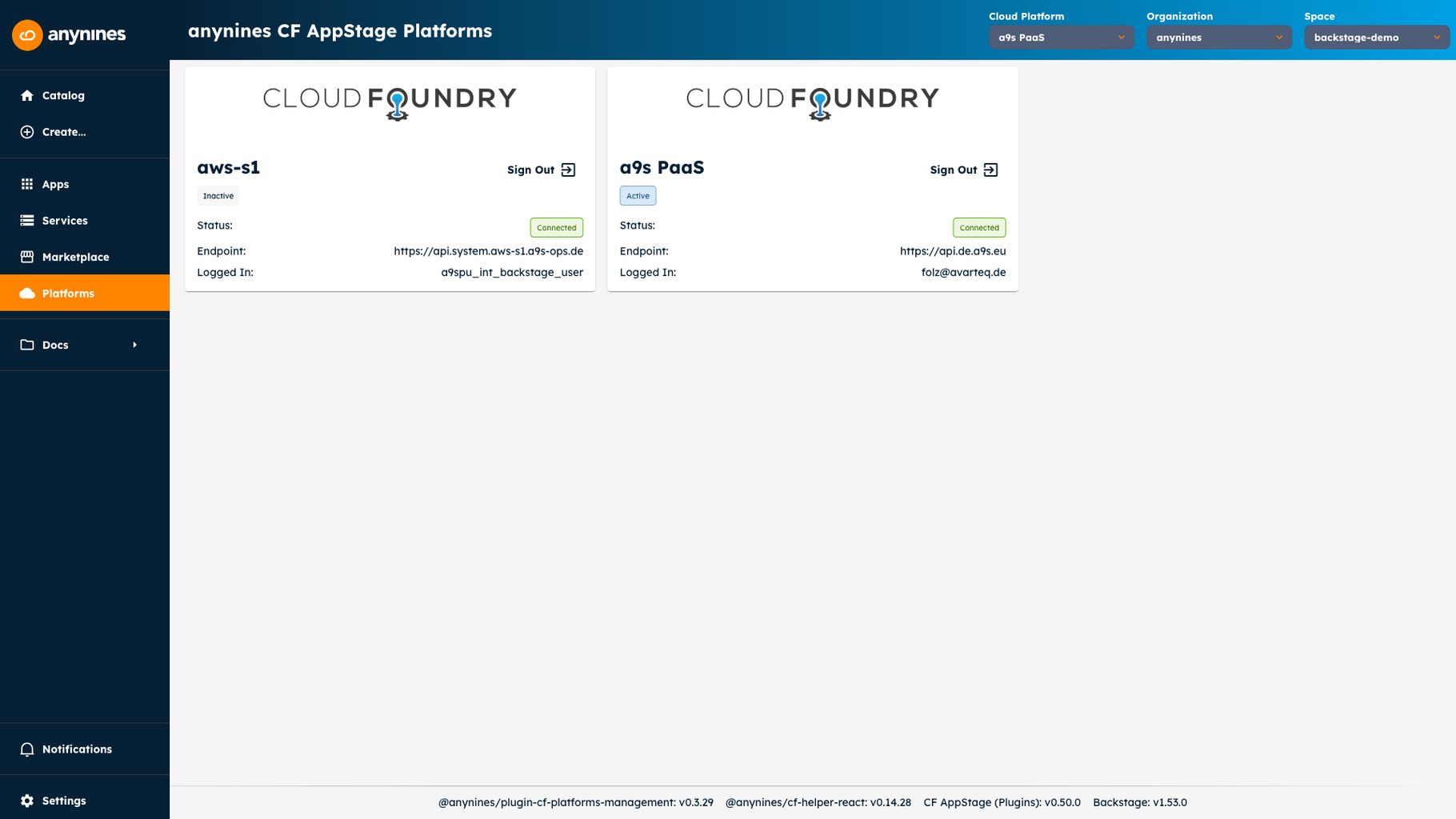
The architecture supports a multi-platform model out of the box. A single CF AppStage deployment can connect to multiple Cloud Foundry foundations simultaneously, each with its own UAA configuration, API endpoints, and organizational structure. Platform teams can consolidate their operational view across heterogeneous Cloud Foundry environments without spinning up separate consoles for each installation.
Configuration is driven by YAML files and environment variables, giving platform operators full control over what features are enabled, which platforms are connected, and how the interface is presented to end users. The console supports white-labeling, allowing organizations to brand the experience with their own name, logo, and color scheme.
Behind the scenes, CF AppStage includes a diagnostics subsystem that runs configuration and connectivity probes on every startup. This helps platform teams catch misconfigurations and connectivity issues before they impact application developers, reducing time spent on troubleshooting and increasing overall platform reliability.
Who Is CF AppStage For?
CF AppStage serves two primary audiences, each with distinct needs and priorities, and the following sections show how it supports them.
- IT-Leads and Platform Decision-Makers benefit from CF AppStage’s ability to consolidate and govern Cloud Foundry operations across enterprise environments. If you’re responsible for platform strategy, evaluating tooling for your Cloud Foundry deployments, or looking to improve the developer experience your platform teams provide, CF AppStage offers a structured approach to platform operations. The multi-platform support means you can manage multiple Cloud Foundry foundations from a single interface, while the white-labeling and configuration options ensure the console aligns with your organization’s standards and branding.
- Senior Platform Operations Engineers appreciate the operational visibility CF AppStage provides. Instead of context-switching between the CLI, log cache, etc., platform operators can manage Cloud Foundry organizations and spaces, review application health, inspect service instances, and access logs — all within a single Backstage-based console. The diagnostics endpoint adds another layer of confidence, allowing operators to proactively verify platform health.
- Senior Application Developers who deploy and manage applications on Cloud Foundry benefit from the intuitive interface provided by CF AppStage. Rather than memorizing CLI commands or navigating the sometimes-confusing native Cloud Foundry UI, developers can browse their applications, view environment variables, manage deployments, and explore the service marketplace through a familiar, modern web interface. The console is designed to reduce the cognitive load of Cloud Foundry operations, letting developers focus on building rather than remembering commands.
Key Capabilities
CF AppStage brings several capabilities that address real operational challenges in Cloud Foundry environments. Rather than listing features, it helps to understand how these capabilities work together to improve your platform’s day-to-day operations and support application developers.
Unified Application Visibility
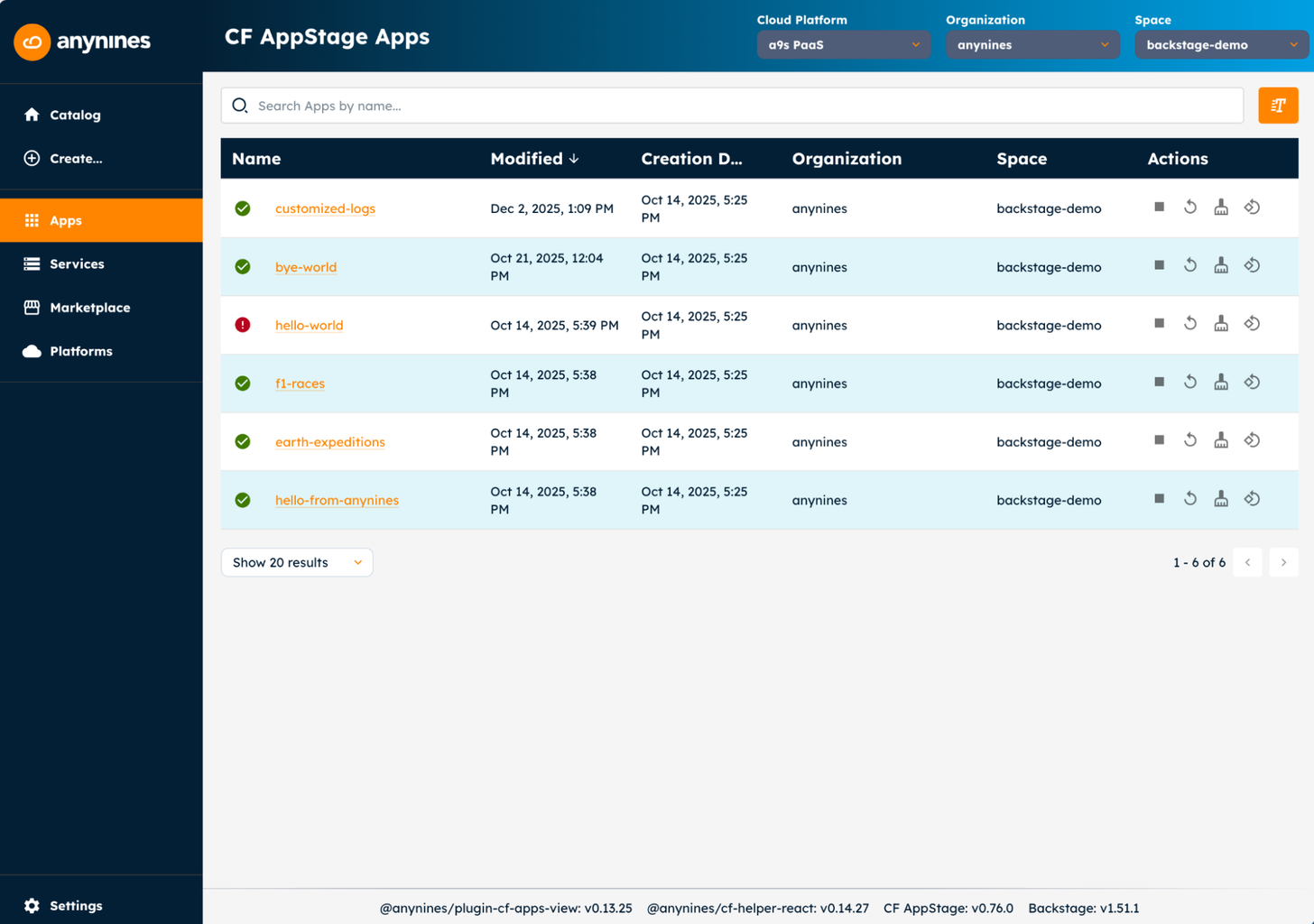
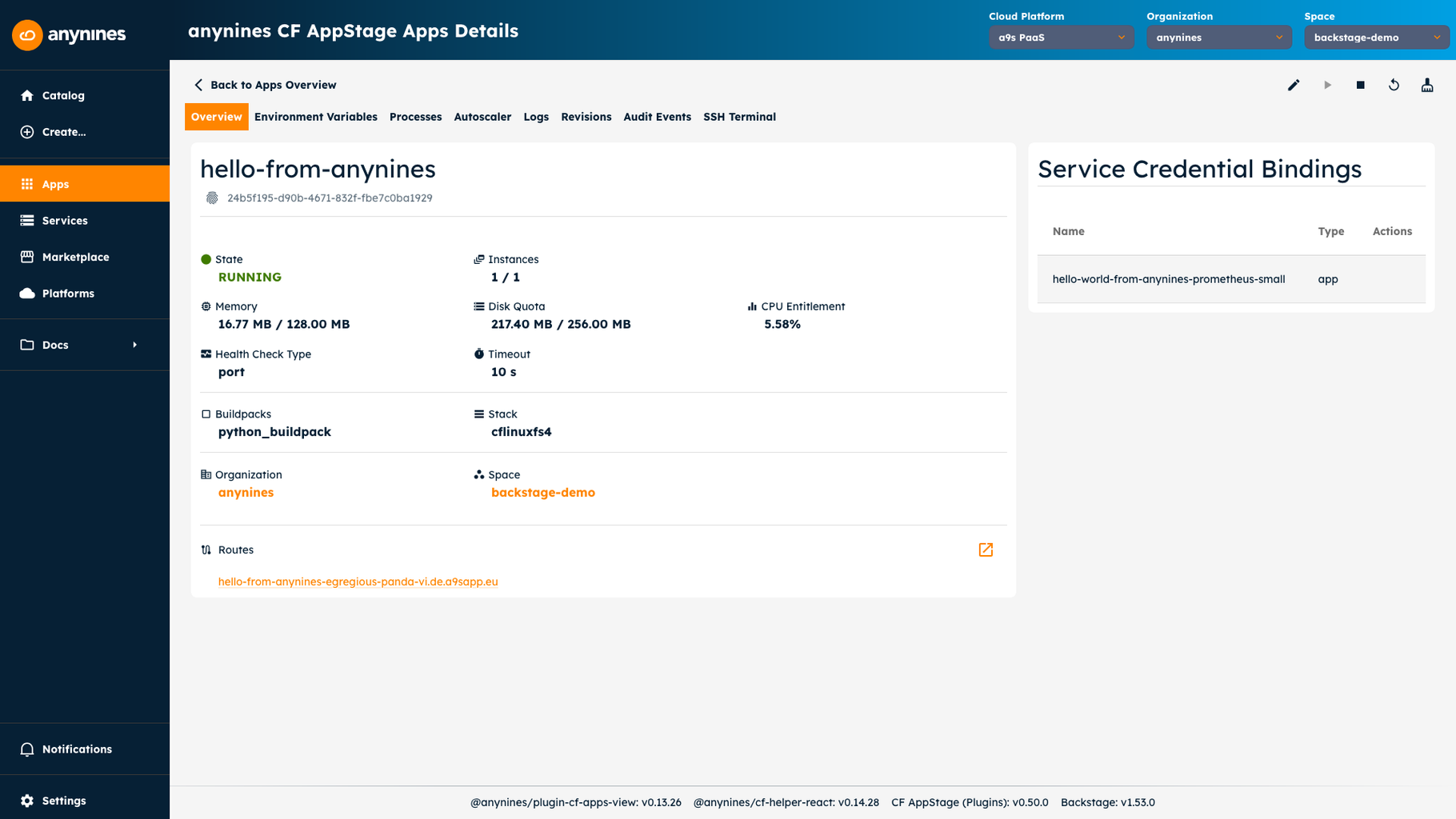
Unified Application Visibility is perhaps the most immediately noticeable capability. CF AppStage surfaces a comprehensive view of Cloud Foundry applications across your connected foundations. You can browse applications by organization and space, inspect their status and health, view environment variables, and access logs, without leaving the console. This eliminates the need to switch between multiple tools just to understand what’s running and how it’s performing.
Service Instance Management
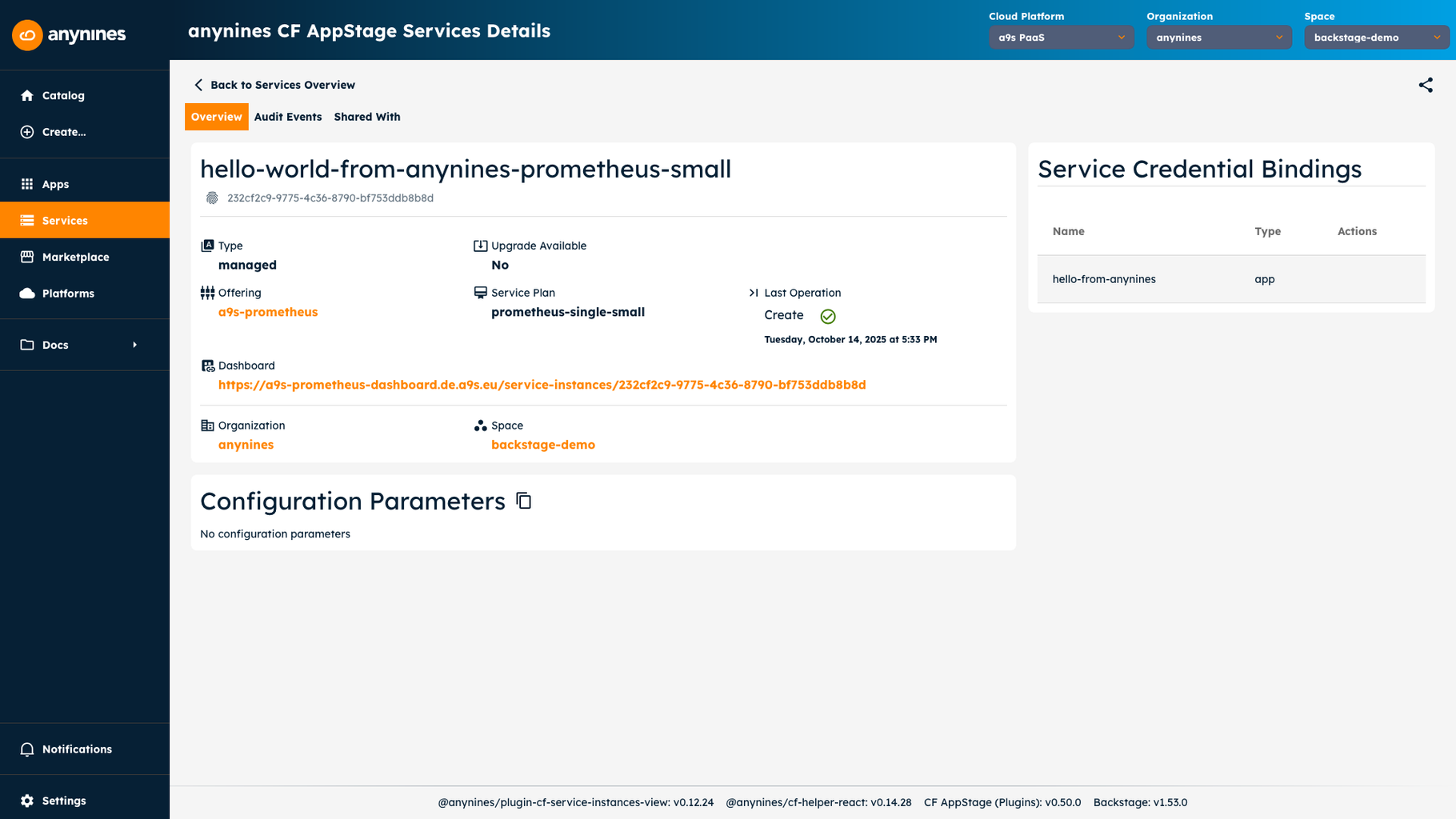
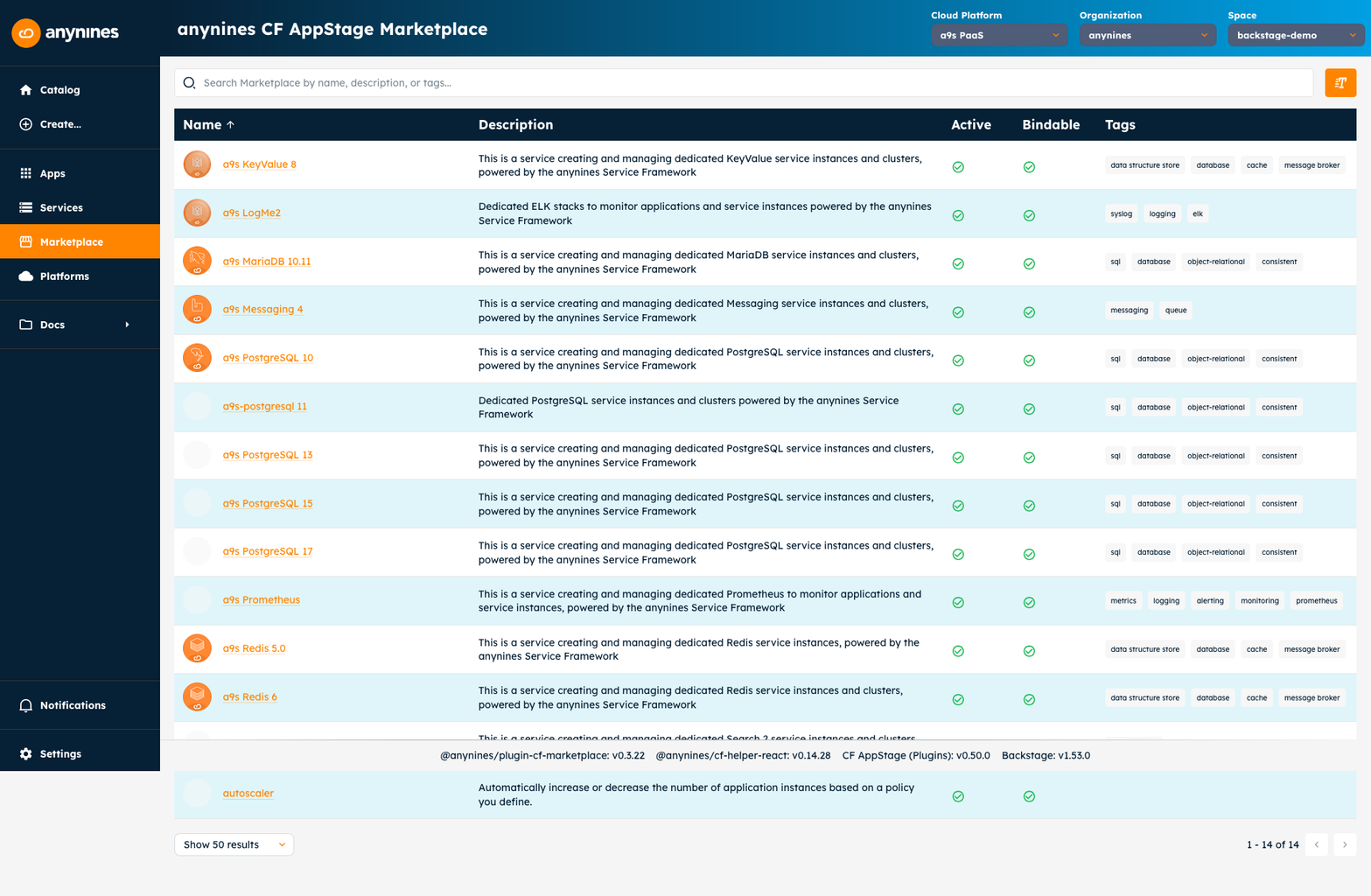
Service Instance Management extends that visibility beyond applications to the services they depend on. Platform teams can explore service instances, review their configurations, and understand binding relationships across organizations and spaces. The service marketplace integration shows available service offerings, helping application developers discover and provision the services their applications need.
Multi-Platform Operations
Multi-Platform Operations address one of the most common challenges in enterprise Cloud Foundry environments. Organizations often run multiple Cloud Foundry foundations, perhaps separated by environment, business unit, or geography. CF AppStage lets platform teams connect to all of them from a single deployment, switching between platforms seamlessly. This consolidation reduces operational overhead and gives leadership a unified view of their Cloud Foundry investments.
Extensible Plugin Architecture
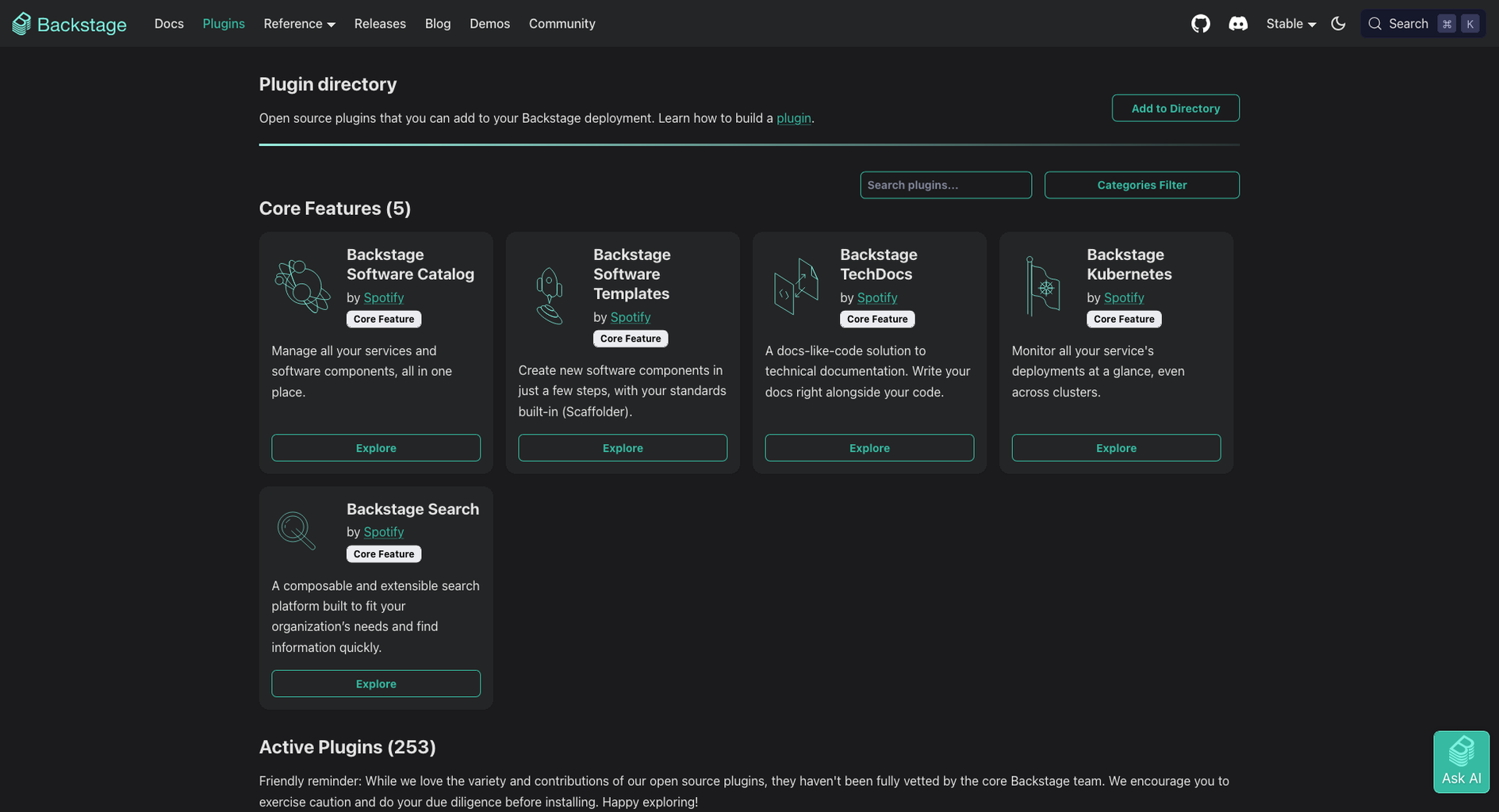
Extensible Plugin Architecture means CF AppStage can evolve with your needs. The console is built as a collection of plugins, each handling a specific concern, such as application management, service instances, or platform configuration. New plugins can be added, existing ones customized, and the overall navigation can be tailored to match your team’s workflows. This extensibility is powered by Backstage’s plugin ecosystem, giving you access to a growing library of platform engineering tools.
Diagnostics and Health Monitoring
Diagnostics and Health Monitoring provide peace of mind for platform operators. CF AppStage runs automated probes at startup to verify configuration, connectivity, authentication, and proxy endpoints. These diagnostics help catch issues early, whether it’s a misconfigured proxy, an expired certificate, or a missing environment variable, before they impact application developers trying to use the platform.
White-Label and Branding Support
White-Label and Branding Support ensure the console fits naturally into your organization’s ecosystem. You can customize the application name, logo, login page text, and available themes. This matters more than it might seem, when a tool feels like it belongs to your organization rather than an external vendor, adoption increases, and the platform becomes a genuine part of your engineering culture.
Common Use Cases
Common Use Cases are scenarios where CF AppStage can provide significant value, and the examples below show where it fits best.
Automating Workflows with Scaffolder
Scaffolder Workflows provide a powerful tooling for customizing and automating Cloud Foundry workflows. By creating YAML files, customers can orchestrate complex CF actions to their exact specifications. CF AppStage ships with a wide selection of pre-configured basic workflows and actions, providing a strong foundation for automation.
Customization can range from mundane tasks, such as “deploying a sample app in newly created spaces,” to complex orchestrations, such as “creating a new space and mirroring all users from another platform into it.” While some advanced actions (like user creation) are part of the roadmap, they are designed to be easily created and reused as building blocks for highly customized, automated platform workflows.
Consolidating Multiple Cloud Foundry Deployments
Mid-sized to large organizations often accumulate multiple Cloud Foundry foundations over time. One for development, another for staging, perhaps separate installations for different business units. Each one has its own console, its own login, its own set of applications and services. CF AppStage lets platform teams connect all of these foundations to a single console, giving application developers a consistent experience regardless of which foundation their application runs on. Platform operators gain a centralized view making cross-platform operations manageable.
Replacing the Legacy Cloud Foundry Console
Many organizations that have adopted Cloud Foundry still rely on the common open source console for day-to-day operations. As their deployments grow, the limitations become more apparent: slow navigation, limited search, poor mobile support, and an interface that hasn’t kept pace with modern web standards. CF AppStage offers a natural replacement path. It provides the same operational capabilities as the legacy console but with a modern interface, faster navigation, and the extensibility to add features that the original console can’t support.
Improving Developer Onboarding
New application developers joining a Cloud Foundry-based organization typically face a steep learning curve. They need to learn CLI commands, understand the organization and space structure, discover available services, and figure out how to access logs and metrics. CF AppStage simplifies this onboarding by providing an intuitive web interface that guides developers through these tasks. Instead of memorizing commands, they can browse their applications, explore the service marketplace, and access logs through a familiar interface. This reduces the time from “new hire” to “productive contributor.”
Self-Service Platform Operations
At its core, CF AppStage provides platform operators with a visual overview of their Cloud Foundry foundations. Applications, services, organizations, and regions, all in one place. Currently, platform teams can use the application as a modern replacement for the native Cloud Foundry console, reducing the need to switch between the command-line interface (CLI), the log cache, and multiple browser tabs, thereby saving time in day-to-day work. For teams that prefer scripts, the console complements them rather than replacing them.
But visual unification of environment fundamentals in a UI overview is just the beginning. We’re actively developing additional features to address the most pressing needs of platform operators: monitoring and alerting. Imagine dashboards that highlight compromised components before they affect users, or alerts that are triggered when a space exceeds its quota. If you’re a platform operator looking to make the shift from reactive “firefighting” to proactive platform management, CF AppStage is the tool of choice.
Conclusion
Cloud Foundry remains one of the most mature and widely adopted platform-as-a-service solutions available. But the tools that help teams operate it haven’t always kept pace with the platform’s capabilities or the expectations of modern development teams. CF AppStage addresses this gap by bringing a Backstage-based, extensible console to Cloud Foundry operations.
Whether you’re an IT-Lead evaluating platform tooling for your organization, a platform operator looking to consolidate your operational view, or an application developer who wants a better experience managing your Cloud Foundry applications, CF AppStage offers a practical path forward. It’s designed for enterprise Cloud Foundry environments, supports multi-platform setups out of the box, and can be customized to fit your organization’s needs.
The goal isn’t to replace Cloud Foundry, it’s to make Cloud Foundry more accessible, more visible, and more productive for the teams that rely on it every day.