Kubernetes is powerful, but operationally heavy. It gives teams a consistent API for scheduling workloads, exposing services, managing configuration, rolling out changes, and integrating with cloud infrastructure. That flexibility creates a cost: someone has to understand containers, registries, manifests, networking, security, rollout behavior, and failure modes.
For application developers, the core tension is control versus developer experience. Kubernetes exposes precise control over how an application runs, but most developers are not trying to manage Kubernetes objects every day. They want to move source code into a reliable runtime, observe whether it works, adjust configuration, scale when needed, and continue building.
This article compares five approaches to deploying applications from source code to Kubernetes:
- Dockerfile plus
kubectl - CI, Cloud Native Buildpacks, and GitOps with Argo CD
- OCI image plus Helm
- OCI image plus Kustomize
cf pushwith Korifi
The approaches move from low-level workflows toward higher-level abstraction.
1. Dockerfile + kubectl
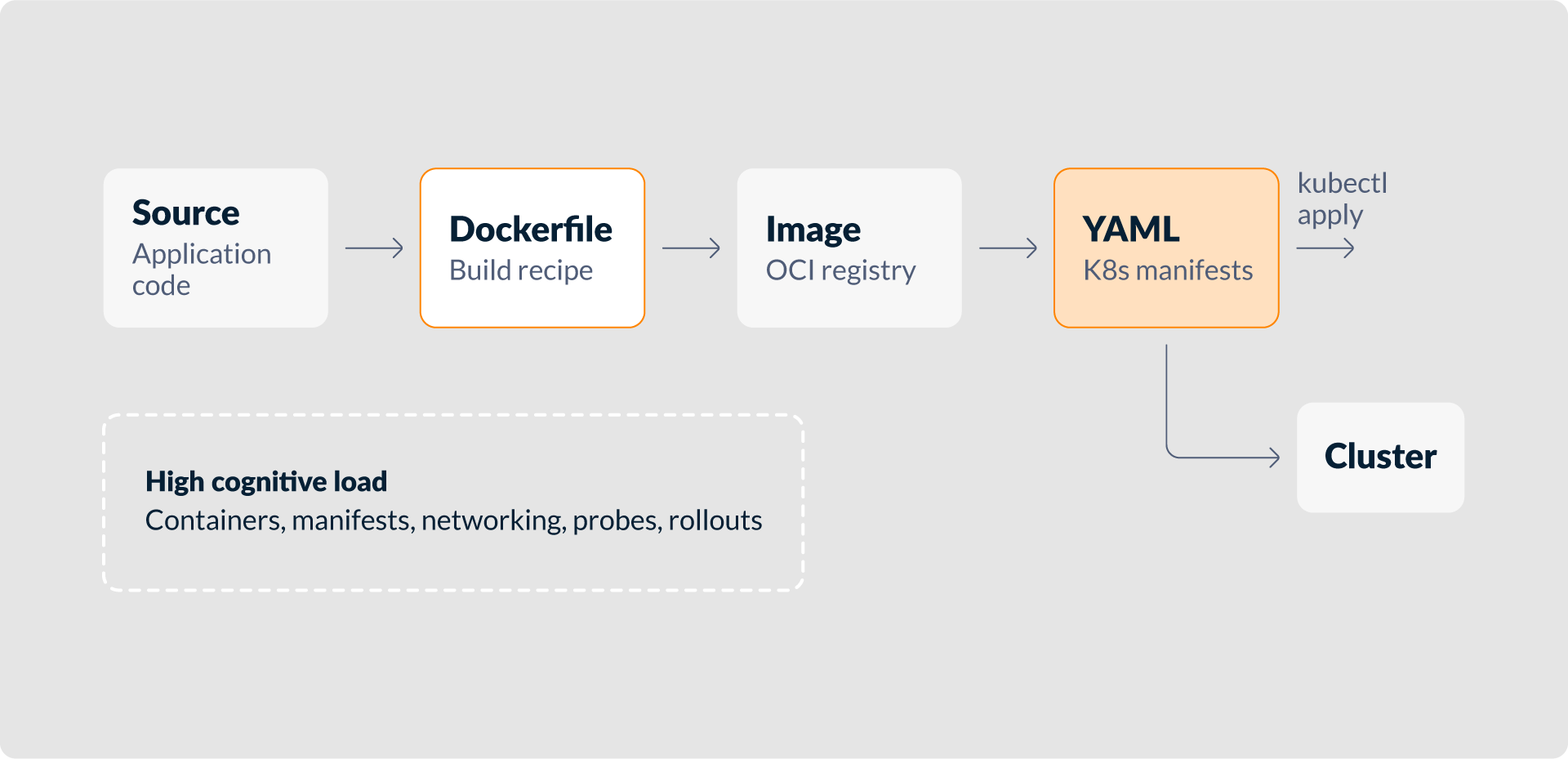
The most direct way to deploy an application to Kubernetes is to perform each step explicitly. A developer writes the application, creates a {{Dockerfile}}, builds a container image, pushes that image to an OCI registry, writes Kubernetes manifests, and applies them with {{kubectl}}.
docker build -t registry.example.com/apps/orders:1.0.0 .
docker push registry.example.com/apps/orders:1.0.0
kubectl apply -f deployment.yaml
kubectl apply -f service.yaml
kubectl apply -f ingress.yamlThe YAML commonly includes a Deployment, a Service, and an Ingress or Gateway API resource. Real applications also need environment variables, secrets, config maps, probes, resource requests, labels, and service accounts.
This approach is foundational. It teaches how an image becomes a pod, how rolling updates work, and how services route traffic. For learning, prototypes, or highly customized workloads, direct control is useful.
The cost is cognitive load. The developer must understand container builds, image tagging, registry authentication, Kubernetes object schemas, service discovery, ingress routing, rollout status, and common failure modes. Small mistakes in selectors, ports, probes, or YAML structure can prevent a deployment from working.
At the organizational scale, the problem becomes consistency. If every team writes its own Dockerfiles and manifests, every team also chooses base images, resource defaults, labels, health checks, and deployment patterns. Dockerfile plus kubectl is important to understand, but it is rarely the best default workflow.
2. CI + Buildpacks + GitOps
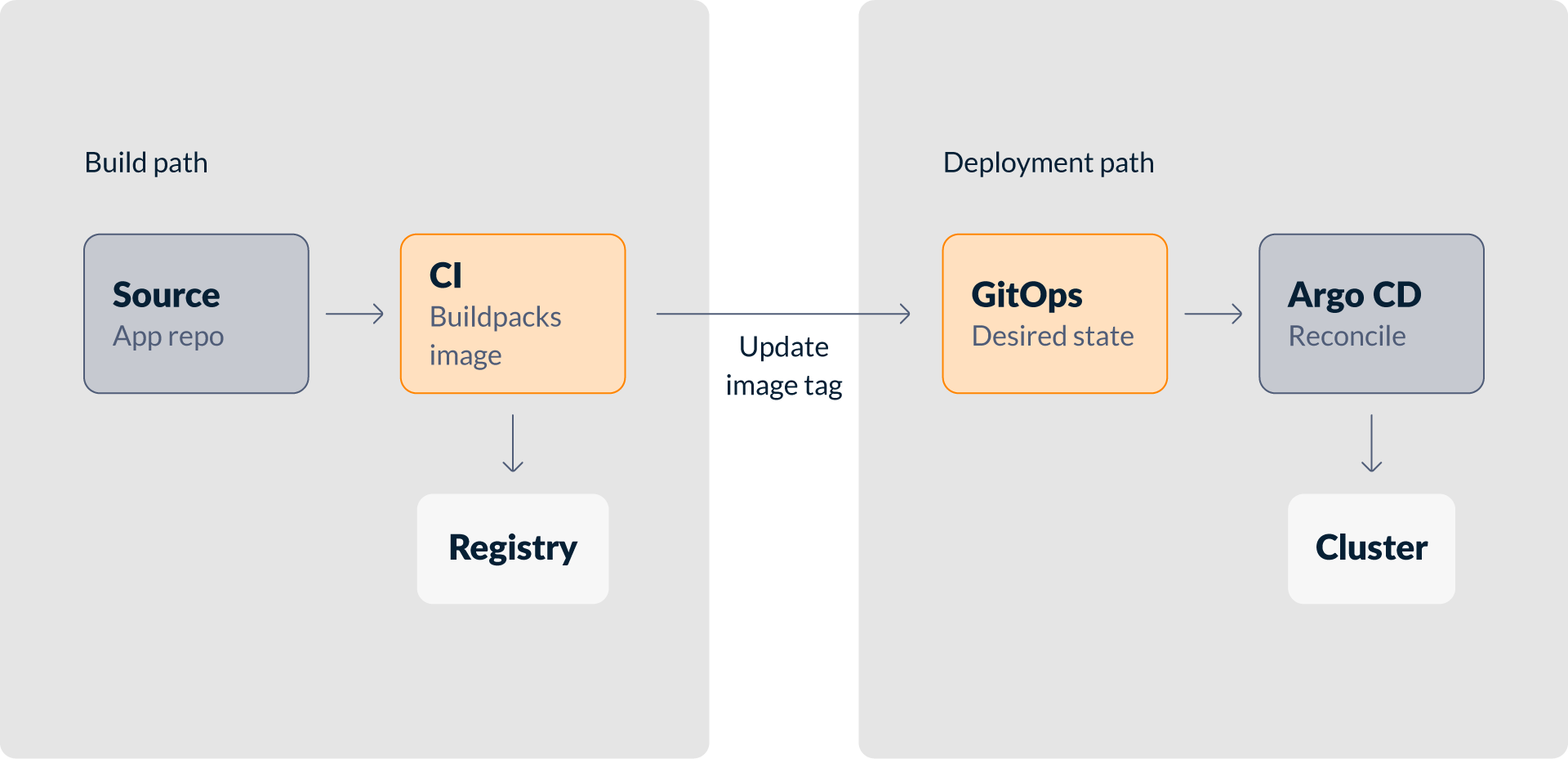
A common next step is to automate the path from source code to cluster. A CI system builds the application, pushes an image, updates the deployment configuration, and lets a GitOps controller reconcile the cluster.
Cloud Native Buildpacks remove the need for a hand-written Dockerfile. Buildpacks inspect the source code, detect the language and framework, assemble a runnable OCI image, and apply runtime conventions.
A typical flow looks like this:
- A developer pushes code to the application repository.
- CI runs tests and builds an image using Cloud Native Buildpacks.
- CI pushes the image to a registry.
- CI updates a GitOps repository with the new image tag or digest.
- Argo CD detects the desired state change and reconciles the Kubernetes cluster.
This separates responsibilities well. CI handles validation and image creation. Git stores the desired deployment state. Argo CD applies that state to the cluster and checks for drift. Deployment history is visible through Git commits.
For platform and DevOps teams, this model has strong operational properties. It supports reviewable changes, promotion flows, rollbacks, environment-specific configuration, and reduced direct cluster access.
The trade-off is pipeline and coordination complexity. Teams maintain CI configuration, buildpack builders, registry credentials, GitOps repository structure, deployment templates, Argo CD applications, access rules, and promotion logic. If app and environment repositories are separate, one change may involve multiple systems and commits.
This approach is powerful, but Kubernetes does not disappear. Someone still maintains the manifests or templates that Argo CD applies. Developers may avoid Dockerfiles, but still need to understand deployment configuration, promotion, and synchronization behavior. It is strong for mature delivery workflows, but less ideal for the shortest source-to-app path.
3. OCI Image + Helm
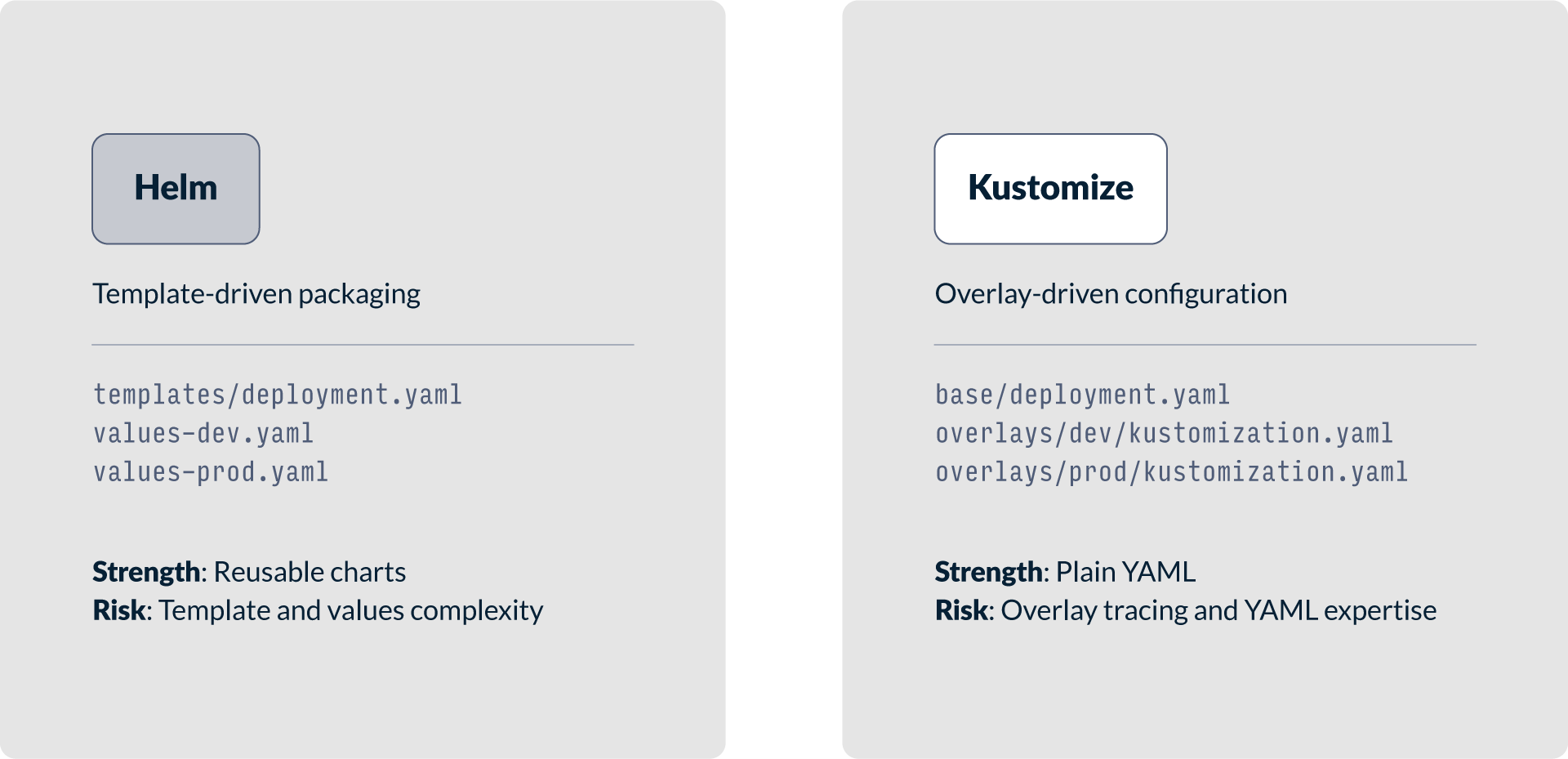
Helm is widely used for packaging Kubernetes applications. In this model, the application is built as an OCI image, and the Kubernetes resources are described in a Helm chart. Deployments happen with helm install or helm upgrade, commonly through a delivery pipeline.
A chart packages related Kubernetes resources together: deployments, services, ingress resources, config maps, RBAC objects, and autoscaling policies. Values files allow settings to vary between environments, such as replica counts, limits, hostnames, and feature flags.
This makes Helm useful for standardized deployments, especially when applications or platform components need to be installed repeatedly across clusters or teams.
The difficulty is template complexity. Helm charts can become hard to read with conditionals, loops, helper templates, and deeply nested values. Debugging often requires rendering the chart with helm template and comparing the output with cluster objects.
At scale, Helm still requires delivery automation. Teams need conventions for chart versions, image versions, environment values, promotion, secrets, rollback, and release ownership. Helm standardizes packaging, but it does not remove the need to build images, manage configuration, or understand the generated Kubernetes objects.
4. OCI Image + Kustomize
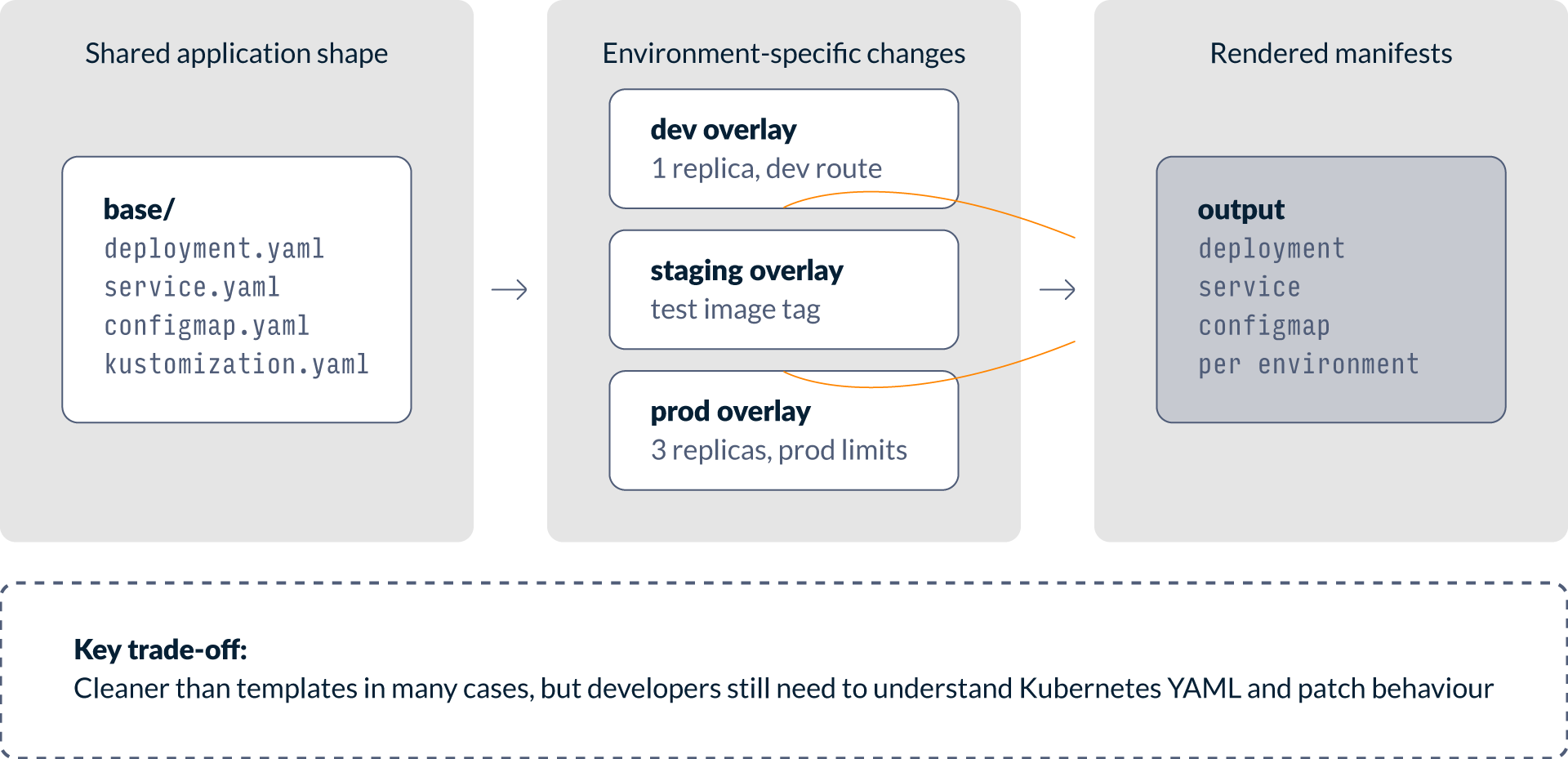
Kustomize takes a different approach from Helm. Instead of templates, it works with plain Kubernetes YAML and applies transformations through bases, overlays, patches, labels, image substitutions, and generators. It is a natural choice for teams that prefer native Kubernetes configuration without a separate templating language.
A common structure defines a base set of manifests and then creates overlays for each environment:
app/
  base/
    deployment.yaml
    service.yaml
    kustomization.yaml
  overlays/
    dev/
      kustomization.yaml
    prod/
kustomization.yamlThe base contains the common deployment shape. Overlays adjust image tags, replica counts, ingress hosts, resource limits, labels, or configuration. This can be cleaner than Helm when the team wants to avoid template logic.
Kustomize is useful for maintaining environment-specific settings while keeping Kubernetes resources visible. Developers and operators inspect real manifests rather than templates.
The trade-off is that Kustomize still expects Kubernetes and YAML expertise. It does not build the image, define releases, manage secrets, or solve promotion. As overlays grow, tracing output can become difficult because a field may come from the base, a patch, a transformer, or a generated resource.
OCI image plus Kustomize is a good fit for teams that want explicit Kubernetes manifests and manageable environment differences. It is less suitable when the goal is to shield developers from Kubernetes object models entirely.
5. cf push with Korifi
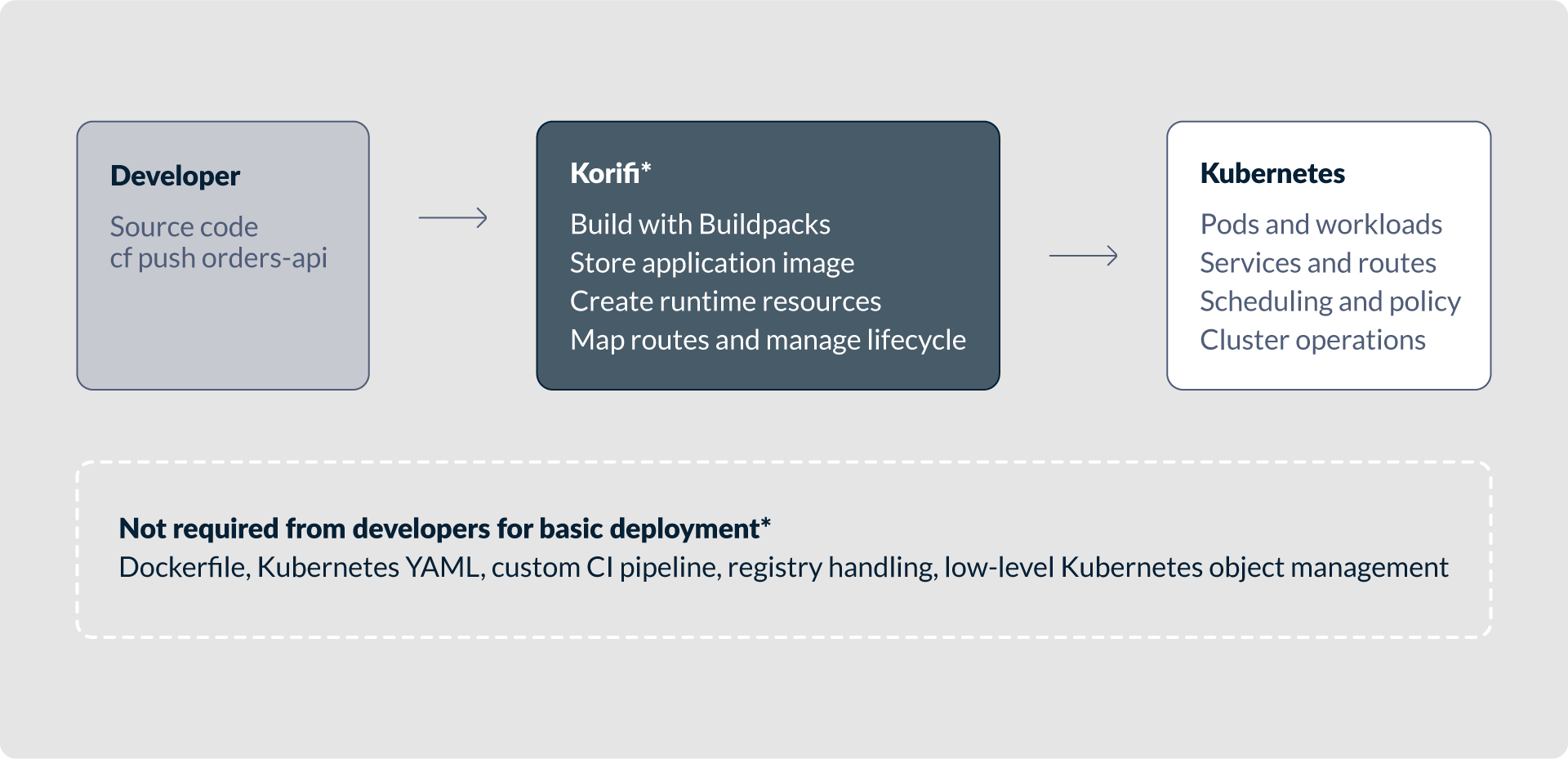
The Cloud Foundry cf push model starts from a different assumption. Instead of asking developers to describe containers and Kubernetes resources, it asks them to describe an application. The developer works from the source code and runs a command such as:
cf push orders-apiWith Korifi, this application-centric workflow runs on top of Kubernetes. Korifi implements Cloud Foundry-compatible APIs and uses Kubernetes as the underlying platform substrate. Developers use the Cloud Foundry experience, while the platform uses Kubernetes to run the workload.
In this model, a developer does not need to provide a Dockerfile, write Kubernetes YAML, or define a CI pipeline just to get a basic application deployed. They also do not need to understand deployment objects, pod templates, services, ingress controllers, image pull policies, or container build mechanics before they can ship code.
The platform takes responsibility for the steps that appear as separate concerns in other workflows. It builds the application using Buildpacks, stores the image, creates runtime resources, maps routes, starts the application, and manages the deployment lifecycle. The developer focuses on source code, routes, environment variables, scale, logs, and health.
That boundary is important. In the manual Kubernetes model, the developer owns most of the path from source to runtime. In GitOps, Helm, and Kustomize models, parts of the path are automated, but developers may still handle deployment configuration and pipeline mechanics. With cf push, the platform team defines the paved road and the developer consumes it through application-level commands.

This does not mean Kubernetes is removed. Kubernetes becomes the platform base rather than the developer interface. Platform engineers still control scheduling, isolation, policy, networking, buildpacks, quotas, domains, security rules, and operational constraints. Developers do not need those details for routine deployments.
For many teams, this is the right abstraction. Most web applications, APIs, workers, and background services do not need custom Kubernetes primitives for every release. They need a repeatable way to build from source, bind configuration, expose a route, scale instances, and inspect logs. Korifi brings the established Cloud Foundry model to Kubernetes.
The immediate benefit is time to first deploy. A developer can move from source code to a running application with a small command surface. There is no Dockerfile to design, no chart to understand, no overlay to patch, and no pipeline to assemble first. This reduces onboarding costs for teams that do not specialize in Kubernetes.
The longer-term benefit is consistency. If teams use the same cf push workflow, the platform team can standardize build behavior, routing, logging, scaling, and runtime conventions. This reduces the number of deployment patterns the organization must support.
The trade-off is that developers accept the abstraction. If an application needs unusual Kubernetes resources, specialized networking, custom operators, or direct pod-level control, cf push may be too constrained. That boundary is what keeps the developer experience simple.
For developer-centric use cases with common workload shapes, cf push with Korifi is often the simplest option. It provides a source-to-application workflow without requiring Dockerfiles, YAML, CI pipelines, or containerization knowledge from every developer.
Comparative Analysis
The five approaches differ less in what Kubernetes can run and more in who owns each part of the delivery path. The practical question is how much Kubernetes the application developer must understand and operate directly.
| Approach | Developer effort | Time to first deploy | Required Kubernetes expertise | CI/CD complexity | Flexibility and control | Best fit |
|---|---|---|---|---|---|---|
| Dockerfile + kubectl | High | Slow | High | Low initially, manual later | Very high | Learning, prototypes, highly custom workloads |
| CI + Buildpacks + GitOps | Medium to high | Medium | Medium | High | High | Mature teams needing auditability and declarative reconciliation |
| OCI Image + Helm | Medium | Medium | Medium to high | Medium to high | High | Reusable packaged deployments across teams or clusters |
| OCI Image + Kustomize | Medium | Medium | Medium to high | Medium | Medium to high | Teams preferring plain YAML and environment overlays |
| cf push with Korifi | Low | Fast | Low for developers | Low for developers, platform-owned | Lower at app level | Developer-centric platforms for standard apps |
A common mistake is to optimize every application workflow for maximum control. Control is valuable when there is a real need for it, but it has a cost. If every team must understand manifests, image construction, CI orchestration, deployment templating, networking, and rollout debugging, that cost appears in onboarding time, incident response, review overhead, and inconsistent production behavior.
Most teams overestimate how much Kubernetes control their developers need for everyday delivery. They may need platform-level control, but not every developer needs direct access to every Kubernetes primitive. The more common requirement is a reliable delivery path with enough configuration to run the application safely.
Key Insight: Developers Usually Want Delivery, Not Manifests
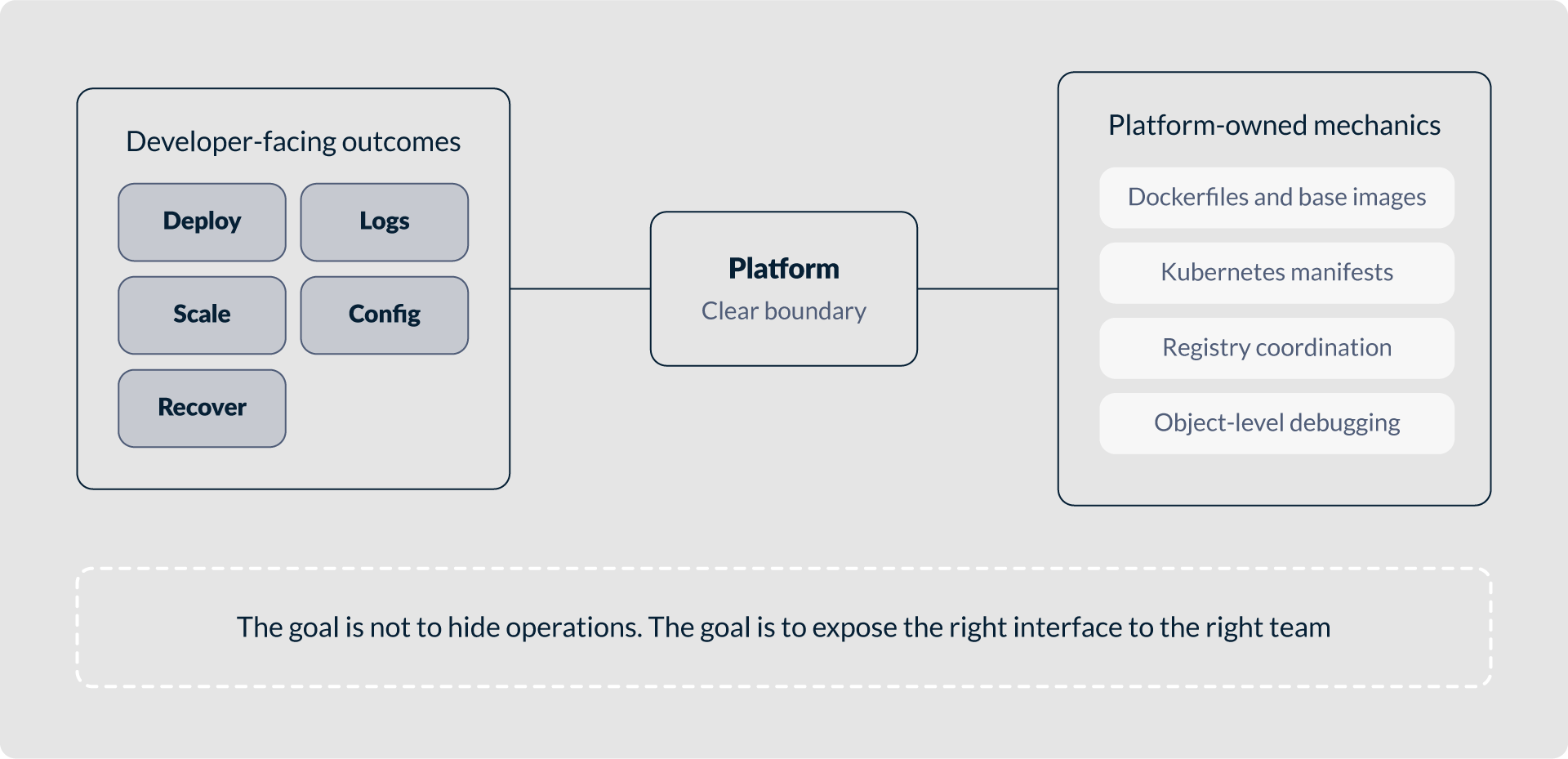
Most application developers care about a small set of outcomes: deploy a change, know whether it started correctly, see logs, configure environment variables, scale the application, and recover. They care about reliability, feedback speed, and predictable operations.
They usually do not care about writing Dockerfiles, choosing base images, managing Kubernetes selectors, debugging rendered Helm templates, designing overlay structures, or coordinating image tags across repositories. Those tasks may be important, but they are platform concerns unless the application has special requirements.
A good developer platform should not hide everything. It should hide what application teams do not need to touch and expose the controls they do need. Korifi follows this pattern by exposing the Cloud Foundry cf push workflow on Kubernetes: Kubernetes remains the execution environment, but not the primary interface for routine delivery.
Brief Decision Guide
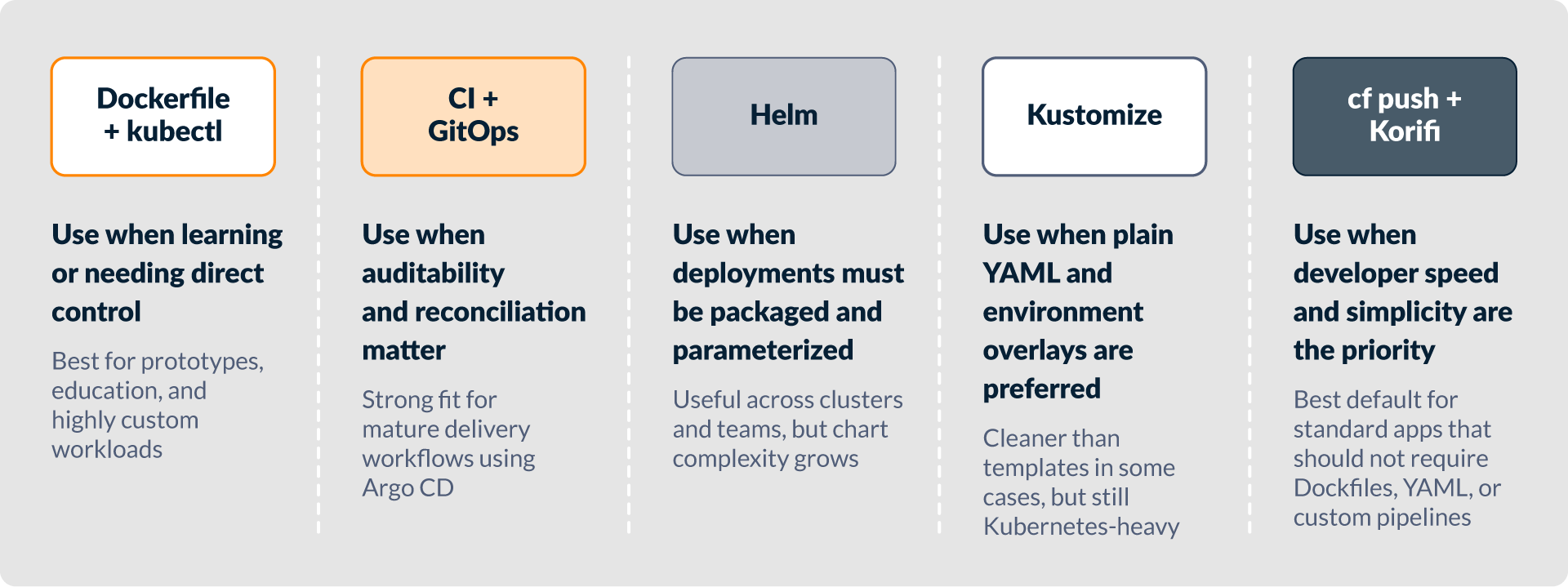
- Use Dockerfile plus
kubectlwhen learning Kubernetes, building a prototype, or needing direct control over container and Kubernetes details. Avoid making it the default path for many teams unless the organization can support the resulting variation. - Use CI plus Buildpacks plus GitOps when auditability, separation of duties, and declarative reconciliation are central requirements. This model is strong when platform teams already operate CI and Argo CD effectively.
- Use Helm when you need reusable, parameterized deployment packages. Be prepared to manage chart complexity and release automation.
- Use Kustomize when you prefer plain Kubernetes YAML and need a clean way to maintain environment-specific differences.
- Use
cf pushwith Korifi when the primary goal is the fastest path from source code to a running application on Kubernetes, especially when teams want to avoid Dockerfiles, YAML, and custom delivery pipelines for standard workloads.
When Not to Use cf push
The cf push model is not the right answer for every workload. It makes common application delivery simple by intentionally abstracting away many low-level Kubernetes controls.
Teams may prefer another approach when applications require highly customized infrastructure, advanced Kubernetes-specific features, direct use of operators or custom resources, specialized networking, unusual storage behavior, or detailed pod-level configuration. In those cases, Helm, Kustomize, GitOps, or direct manifests may provide the necessary control.
It may also be unnecessary in organizations that already have a mature internal developer platform based on Backstage, Crossplane, custom service catalogs, golden path templates, or policy-driven infrastructure APIs. If those platforms are widely adopted, another abstraction may not improve the system.
The decision should be based on workload shape and organizational needs. If developers frequently need direct Kubernetes features, cf push may feel restrictive. If they mostly deploy standard applications, the restriction is often an advantage because it removes decisions they should not have to make.
Conclusion
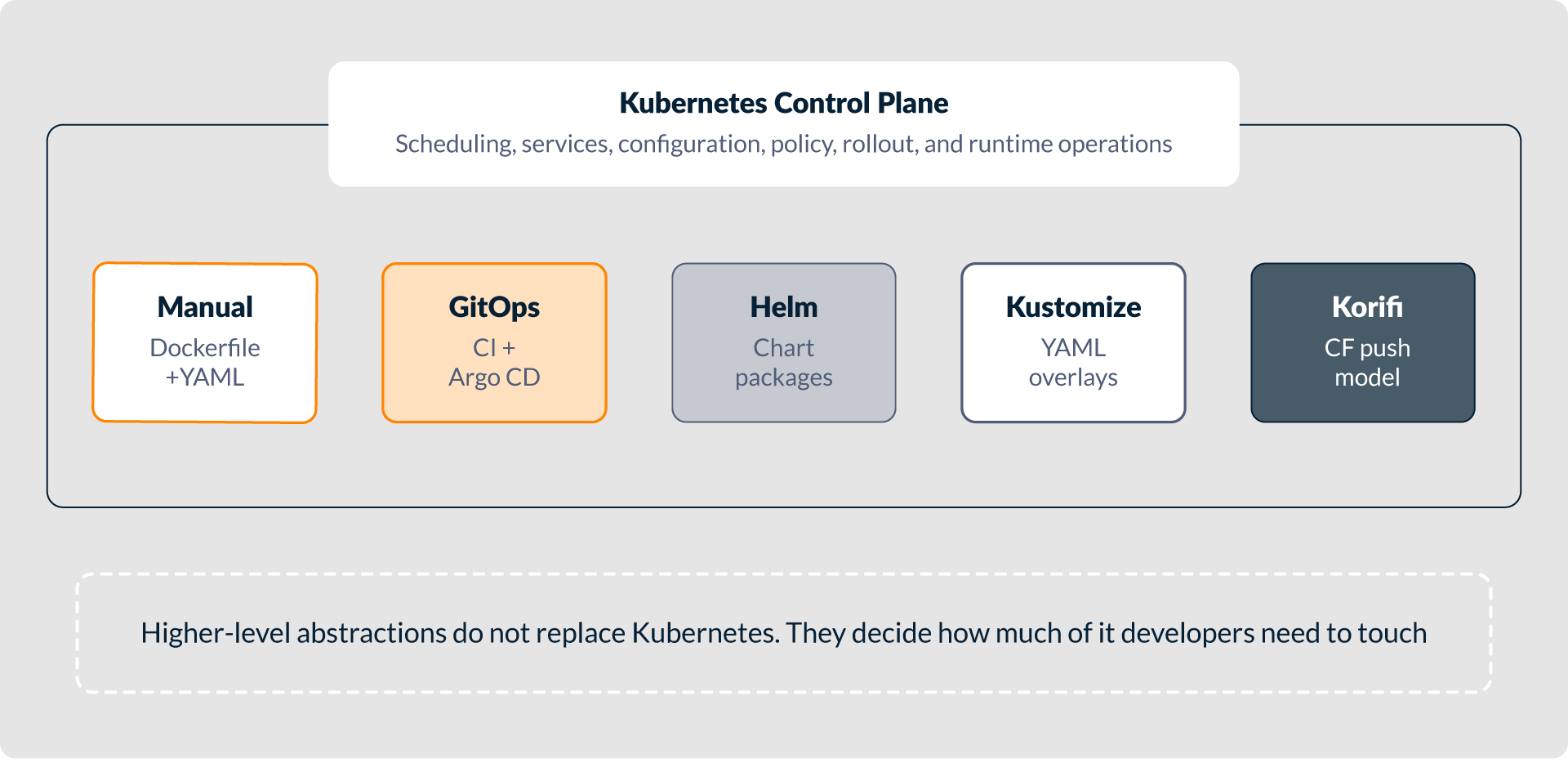
Kubernetes is powerful because it provides flexible primitives for running many kinds of workloads. That flexibility creates many ways to solve the same delivery problem: manual YAML, CI and GitOps, Helm, Kustomize, or an application-level workflow with cf push and Korifi.
The right choice depends on where the organization wants complexity to live. Low-level approaches give developers more direct control, but require more Kubernetes, container, and delivery expertise. Higher-level approaches move that complexity into the platform layer.
For many development teams, the practical need is not direct access to Kubernetes internals. The need is a reliable way to deploy source code, configure the application, expose it, scale it, and observe it. Korifi addresses that need by bringing the Cloud Foundry cf push model to Kubernetes, without requiring Dockerfiles, YAML, custom CI pipelines, or containerization details for routine deployments.
Kubernetes remains the control plane, but it does not always need to be the developer interface.